


Kustom Weather Plugin
3.827.00 Reviews
App Specs
- Version
- 1.21b308210
- Updated On
- License
- Free
- Downloads
- 100,000+
- Developer
- Kustom Industries
- Categories
- Weather
- Platform
- Android
Screenshots
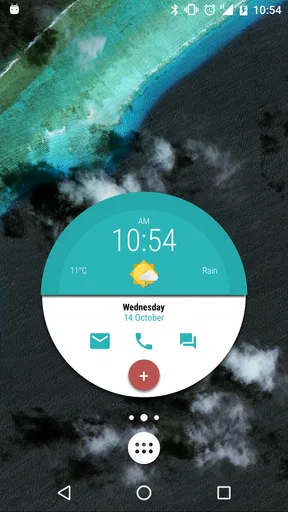
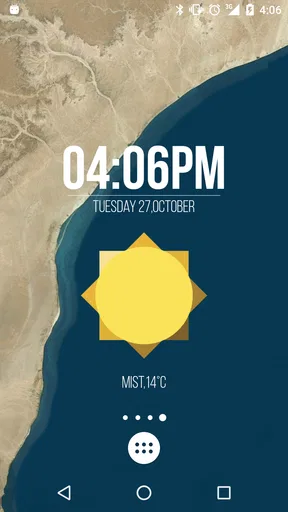
 Analysis by AppCompare
Weather apps are like the unsung heroes of our smartphones. One of the coolest ones I’ve stumbled upon recently is the Kustom Weather Plugin. Now, if you’re like me and love having everything customized down to the last pixel, this app is going to be right up your alley. Let me walk you through my experience with it.
First Impressions and Setup
The first thing that hit me when I opened the Kustom Weather Plugin was its sleek, minimalist interface. It’s like a blank canvas, waiting for you to sprinkle your creativity all over it. Setting it up was a breeze. After downloading, I was prompted to integrate it with Kustom Live Wallpaper (KLWP) or Kustom Widget Maker (KWGT). If you’ve got those apps, you’re already halfway there.
Once I got it running, I appreciated how seamless the integration was. The plugin doesn’t just slap information on your screen. Instead, it lets you decide how you want your weather data to look and feel. Want a futuristic vibe? You got it. Prefer a classic, clean look? Easy peasy. The flexibility here is just fantastic.
Customization Options Galore
Alright, let’s dive into the meat of it: customization. This is where the Kustom Weather Plugin really shines. The level of detail you can tweak is mind-blowing. You can adjust the size, color, and positioning of every element. The weather icons can be changed to match your theme, and you can even add animations to give it some life.
What really blew me away was the ability to add layers of information. For instance, you can set up a widget that shows the temperature, humidity, and wind speed, all beautifully arranged. And if you’re feeling adventurous, you can throw in the UV index or precipitation levels. It’s like having a weather station right on your home screen.
User Experience and Performance
Using the app is a smooth ride. I didn’t experience any lags or crashes, which is always a relief. The data is updated in real-time, so you won’t get caught in the rain without your umbrella. It pulls information from reliable sources, which ensures accuracy. Plus, you can set up different profiles for different locations. Handy, right?
One of the things I really appreciate is the battery efficiency. Despite all the animations and live updates, it doesn’t drain your battery like some other weather apps do. I could go about my day without worrying about my phone turning into a brick by noon.
Worth Reading Before You Choose

EA SPORTS FC Mobile 26 Is a Bigger Football Game, but It Takes Time

Flipboard Shows What News Apps Must Do Beyond the Feed

Switching to Android Auto Means Rethinking Your Driving Routine

Google Calendar Makes a Crowded Week Easier to Manage

Ludo King Makes the Most of the Minutes Between Plans

Baby Panda World Brings Quick Play to Modern Phones, but Its Game Library Feels Busy
Community and Support
A quick shoutout to the community. The support for this app is fantastic. There are tons of tutorials and guides available online if you ever get stuck or need some inspiration. The developers are active and responsive, which is always a comforting thing to know. They’re constantly rolling out updates based on user feedback, so the app just keeps getting better.
Oh, and if you’re into sharing your creations, there’s a vibrant community out there eager to see what you’ve cooked up. It’s like being part of a club where everyone’s showing off their latest masterpieces. Pretty cool, if you ask me.
Making the Weather Panel Useful Every Day
The strongest everyday use is not simply putting a temperature on the home screen; it is deciding which details deserve space and arranging them so they answer a real question quickly. I would start with current conditions and a small forecast cue, then add wind or precipitation only if those details change what I do. A dense panel can look impressive in a screenshot but become harder to scan while I’m heading out the door.
For a weekday commute, I’d keep the essentials visible and use the rest of the screen for the information I check most often. Before leaving, a glance at temperature and rain conditions can help me choose a jacket or carry an umbrella. Later, the same panel can make a quick check convenient without opening a full-screen forecast app. That practical rhythm is where a custom weather display earns its place rather than relying on novelty.
There is also a useful design trade-off: adding more values does not automatically make the display more informative. Humidity, wind speed, UV index, and precipitation can all be relevant, but their usefulness depends on the day and the person. I’d avoid giving every metric equal visual weight. Put the most actionable item where your eye lands first, and leave secondary details quieter so the layout remains readable.
Where It Fits Among Weather Apps
Compared with a conventional weather app, this plugin is best understood as a way to bring weather information into a Kustom-made widget or wallpaper, not as a replacement for every part of a forecast service. A standalone weather app is usually the simpler choice if you want to open one screen, browse forecast details, and leave. Here, the payoff comes from shaping the presentation around your own home screen and routine.
The store summary describes support for Darksky (Forecast.io) and AccuWeather providers as Kustom weather sources. That choice matters because a weather source influences the information feeding the design; customization cannot make an unsuitable forecast source more useful. If you already prefer one of those options, the plugin may fit naturally into a Kustom setup. If you mainly want a ready-made app with a straightforward forecast interface, the extra layer of Kustom configuration may feel unnecessary.
I’d also treat a compact home-screen panel as a prompt for a quick check, not as a guarantee that conditions will stay unchanged. For plans that depend heavily on rain or changing weather, I’d open the relevant forecast view before setting off. That’s a sensible habit with any quick-glance display: it keeps the convenience while avoiding the mistake of treating a small widget as the whole forecast.
Who Will Get the Most from It
This is a good fit for people who already enjoy making their Android home screen their own and are comfortable using Kustom Live Wallpaper or Kustom Widget Maker. It is especially appealing if you want weather information to match a particular visual theme instead of accepting the fixed layout of a standard weather app. The appeal is practical as well as decorative when a well-planned panel lets you see the conditions you care about without another tap.
I would skip it if I wanted the quickest possible setup, did not use Kustom’s other tools, or rarely look at weather outside an occasional search. The plugin’s value is tied to a Kustom workflow, so installing it alone is unlikely to deliver the same payoff as adding it to a layout you already maintain. Someone who wants detailed forecasts first and home-screen design second may be happier with a conventional weather app as their main tool.
One question worth considering before building a layout is whether you will still want to maintain it after the first burst of creativity. A design that depends on several small elements can take more thought to adjust than a simple temperature display. I’d begin with a modest arrangement, use it for a few days, and add details only when I notice a genuine gap. That avoids spending time polishing information I rarely check.
Month-to-Month Value and Maintenance
The developer is Kustom Industries, and the app is a free weather utility rated for Everyone. It has a 3.7 average from around 560 ratings and has passed 100,000 installs, which gives a prospective user a sense of its footprint without telling the whole story of whether it suits an individual setup. The current version is 1.21b308210, and the app first appeared on August 6, 2017. Optional in-app purchases range from $1.49 to $4.99 per item.
Those details make the decision fairly easy to frame: the basic download does not require an upfront purchase, but the wider Kustom experience may involve optional purchases. I’d check what is included in the version I plan to use before committing to a particular design workflow. The plugin is most worthwhile when it becomes a small, dependable part of a screen I already use, not when I keep redesigning it simply because the customization options invite experimentation.
For maintenance, I’d keep a copy of a layout that works before making major changes, and avoid rebuilding the whole screen whenever I want to adjust one weather detail. A stable, minimal panel is easier to live with than a highly elaborate one that needs frequent attention. If the display stops matching my routine, I would remove an unused metric or simplify the arrangement rather than treating every change as a reason to start over.
Weather information also has a natural limit: a personalized display improves access and presentation, but it does not eliminate uncertainty in forecasts. The best long-term setup is one that makes a useful check easier while leaving room to consult a fuller forecast when the decision matters. In that sense, the plugin’s recurring value depends less on how many fields I can fit and more on whether I continue to notice and trust the ones I chose.
The Final Word
In conclusion, the Kustom Weather Plugin is more than just a weather app; it’s a playground for those who love to customize and tweak their phone’s appearance. Whether you’re a weather enthusiast or just someone who enjoys a personalized home screen, this app is worth checking out. It’s got the looks, the brains, and the performance to back it all up. So, if you’re ready to take your weather game to the next level, give it a spin. You won’t be disappointed.
Remember, you can grab it from your favorite app store, and don’t forget to share your creations with the rest of us!
Pros
- Highly customizable weather widgets.
- Accurate real-time weather updates.
- Integrates seamlessly with Kustom apps.
- Minimal battery consumption.
- User-friendly interface.
Cons
- Limited features without premium version.
- Occasional syncing issues.
- Requires Kustom app installation.
- No offline weather data.
- Ads in the free version.
FAQs for Kustom Weather Plugin
What is the Kustom Weather Plugin used for?
The Kustom Weather Plugin is designed to enhance your Kustom apps by providing detailed weather information. It integrates seamlessly with KWGT, KLWP, and other Kustom apps to offer real-time weather updates, forecasts, and customizable weather widgets. Users can personalize their home screen experience with accurate and aesthetically pleasing weather data.
Is Kustom Weather Plugin compatible with all devices?
The Kustom Weather Plugin is compatible with Android devices running version 4.4 and up. It requires integration with Kustom apps like KWGT or KLWP to function properly. Ensure your device meets these requirements and that you have the necessary Kustom app installed before downloading the plugin.
Does the Kustom Weather Plugin consume a lot of data or battery?
The Kustom Weather Plugin is optimized to provide weather updates without excessive data or battery usage. It updates weather information at user-defined intervals, which helps manage data consumption. Users can adjust settings to balance between update frequency and resource usage, making it efficient for everyday use.
How customizable is the weather information with this plugin?
The Kustom Weather Plugin offers extensive customization options. Users can modify widget designs, choose different weather data sources, and personalize how weather information is displayed. This flexibility allows users to tailor the weather experience to their aesthetic preferences and functional needs, making it a versatile tool for personalization.
Do I need to pay for the Kustom Weather Plugin?
The Kustom Weather Plugin may be available as a free download, but some features might require in-app purchases or a pro version of the Kustom apps. Check the app store listing for detailed pricing information and to understand which features are included in the free version versus the paid upgrades.


